Wireless earbuds for musicians work well for practice and for everyday listening, but they do not fit every job. The reason is latency, the small delay between a sound and the moment we hear it in our ears.
A delay we never notice while watching a video can ruin a take when we are playing along to a click track. That is why a pair that sounds great on a train can be the wrong choice on stage.
Below we list six picks, from true wireless earbuds to wireless in-ear monitor systems, and then we explain latency, codecs and fit. We do not claim lab tests we have not run, so every figure is a rating from the maker or a measurement that we mark as such.
Our Top Picks for Wireless Earbuds for Musicians
We chose these picks by the job they do, because the same pair can be great for practice and wrong for the stage. Some are true wireless earbuds and some are wireless IEM systems, so each one has a different job. For a wider list of earbuds outside music, see our guide to the best wireless earbuds.
- JLab Epic Lab Edition: best for practice and light production
- Sennheiser IE 100 Pro Wireless: best hybrid of wired and wireless
- Xvive U4: best compact wireless IEM system
- Xvive U45: best for the stage on the 5.8GHz band
- Bose QuietComfort Ultra Earbuds (2nd Gen): best for noise cancelling and aptX Adaptive
- Apple AirPods Pro 3: best for iPhone owners who only listen
Mini Reviews of the Best Wireless Earbuds for Musicians
JLab Epic Lab Edition
We put the JLab Epic Lab Edition first because it is the one pair in our list that tackles the delay inside a normal earbud. It comes with a USB-C dongle that the maker rates at 50 ms, against over 200 ms for music over Bluetooth. The dongle takes priority over Bluetooth while it is plugged in.
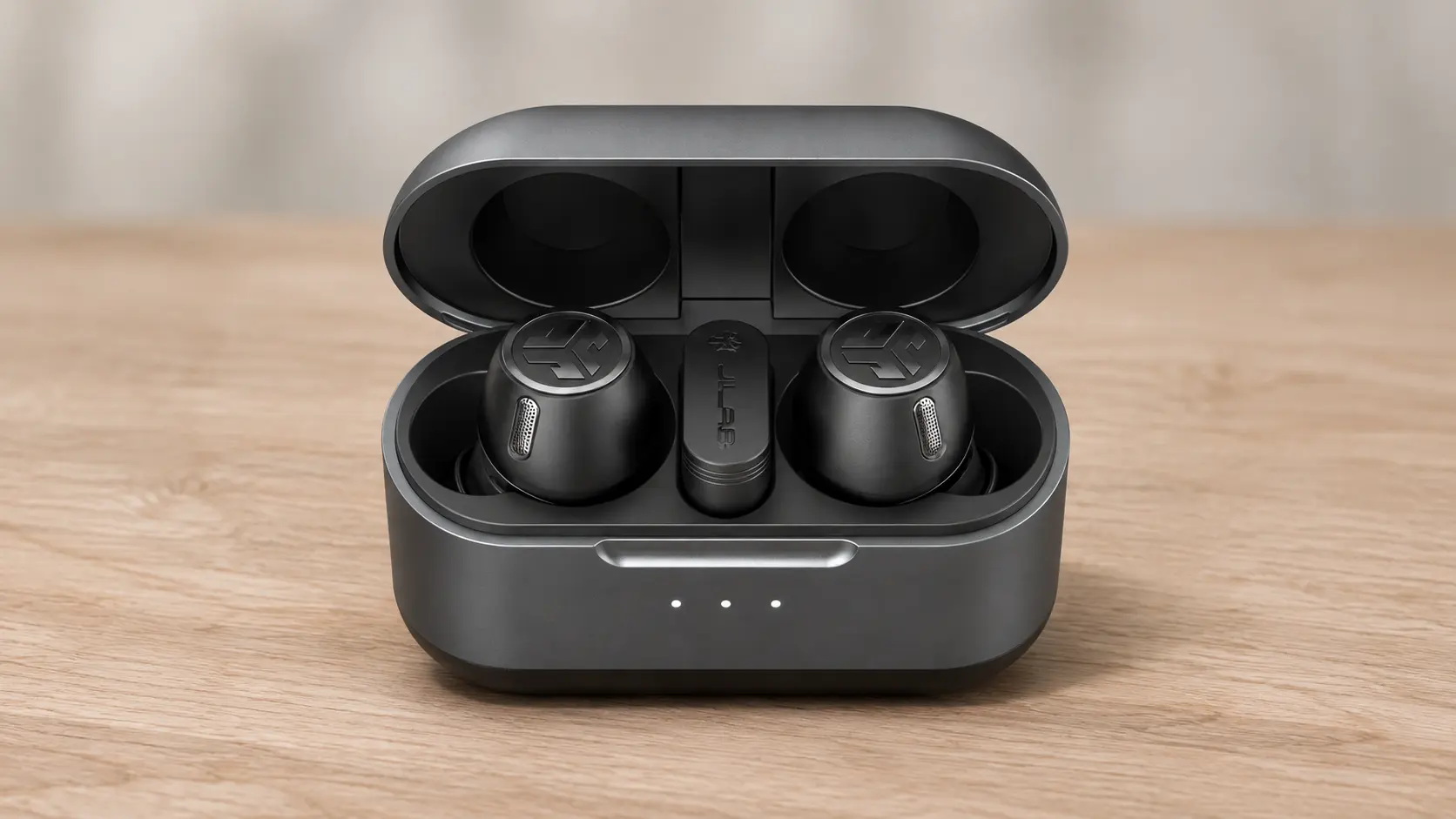
The earbuds use a hybrid dual driver, a 10 mm dynamic driver with a Knowles balanced armature, and the app gives us EQ and safe hearing settings. At the time we checked, the listed price was $209.99.
| Spec | Detail |
|---|---|
| Delay with dongle | 50 ms |
| Delay over Bluetooth, music | Over 200 ms |
| Battery | 56 hours total, 36 hours with ANC |
| Water resistance | IP55 |
- Pro: dongle with a rated 50 ms delay
- Pro: hybrid drivers, LDAC, EQ in the app and a 2 year warranty
- Con: Bluetooth delay for music is over 200 ms
- Con: multipoint only works with the dongle unplugged
Sennheiser IE 100 Pro Wireless
The Sennheiser IE 100 Pro Wireless is a wired in-ear monitor with a clip-on Bluetooth module, and that is why we call it a hybrid. We can use the detachable 1.3 m cable for monitoring and clip on the module when we only listen.
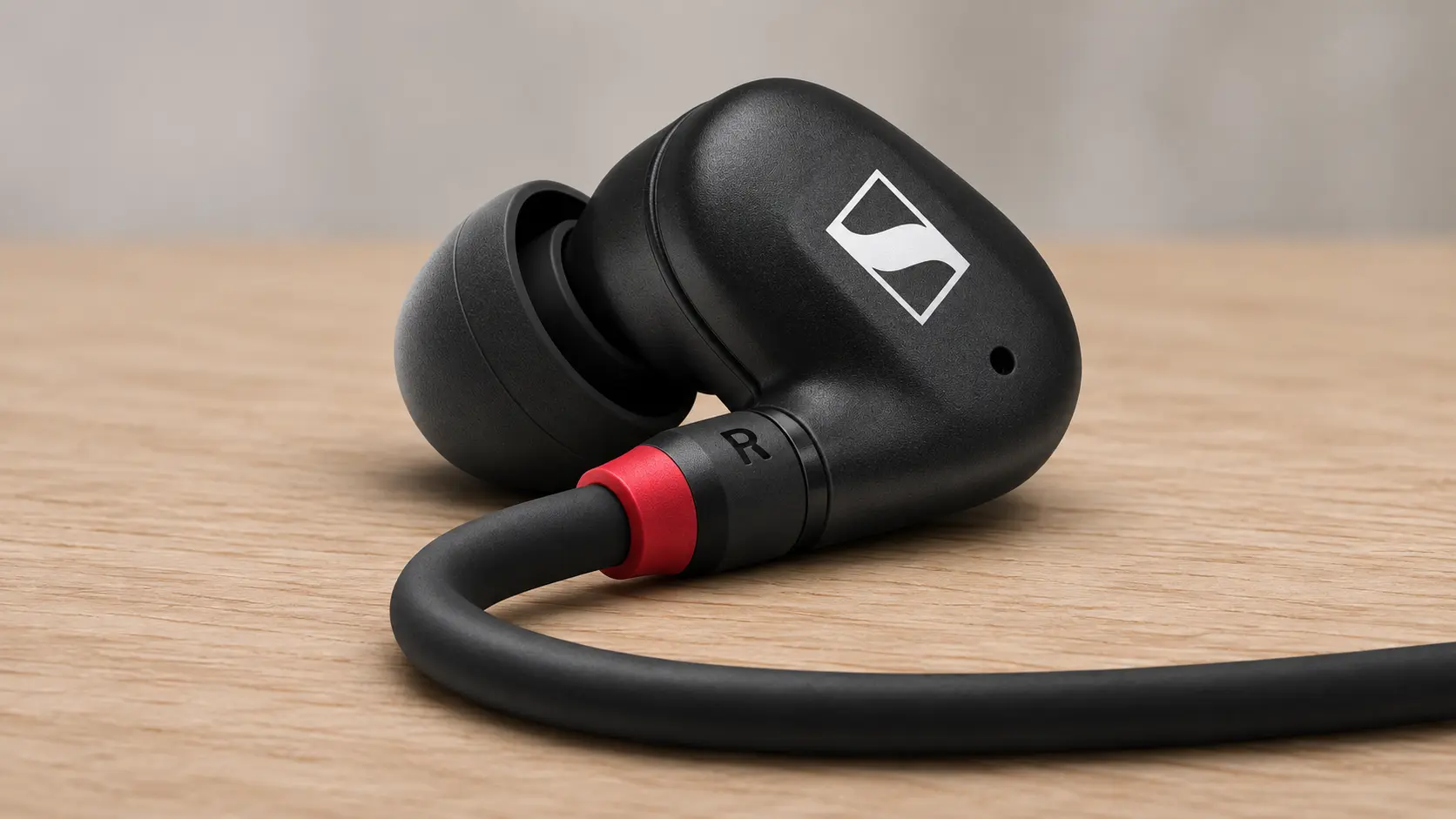
The module supports SBC, AAC, aptX and aptX Low Latency. Foam and silicone ear adapters come in the box, and that helps with fit and isolation.
| Spec | Detail |
|---|---|
| Bluetooth | 5.0, SBC, AAC, aptX, aptX Low Latency |
| Module battery | Up to 10 hours, 1.5 hours to charge |
| Driver | Dynamic, 20 Hz to 18 kHz, 20 ohms |
| Warranty | 2 years |
- Pro: wired monitoring and wireless listening in one set
- Pro: foam and silicone ear adapters in the box
- Con: the module lasts up to 10 hours per charge
- Con: aptX Low Latency needs a source that supports it
Xvive U4
The Xvive U4 is a wireless IEM system and not a pair of earbuds. A plug-on transmitter goes into the output of a mixer, interface or instrument, and a bodypack receiver sends the signal to wired earphones. It works on the 2.4GHz band.
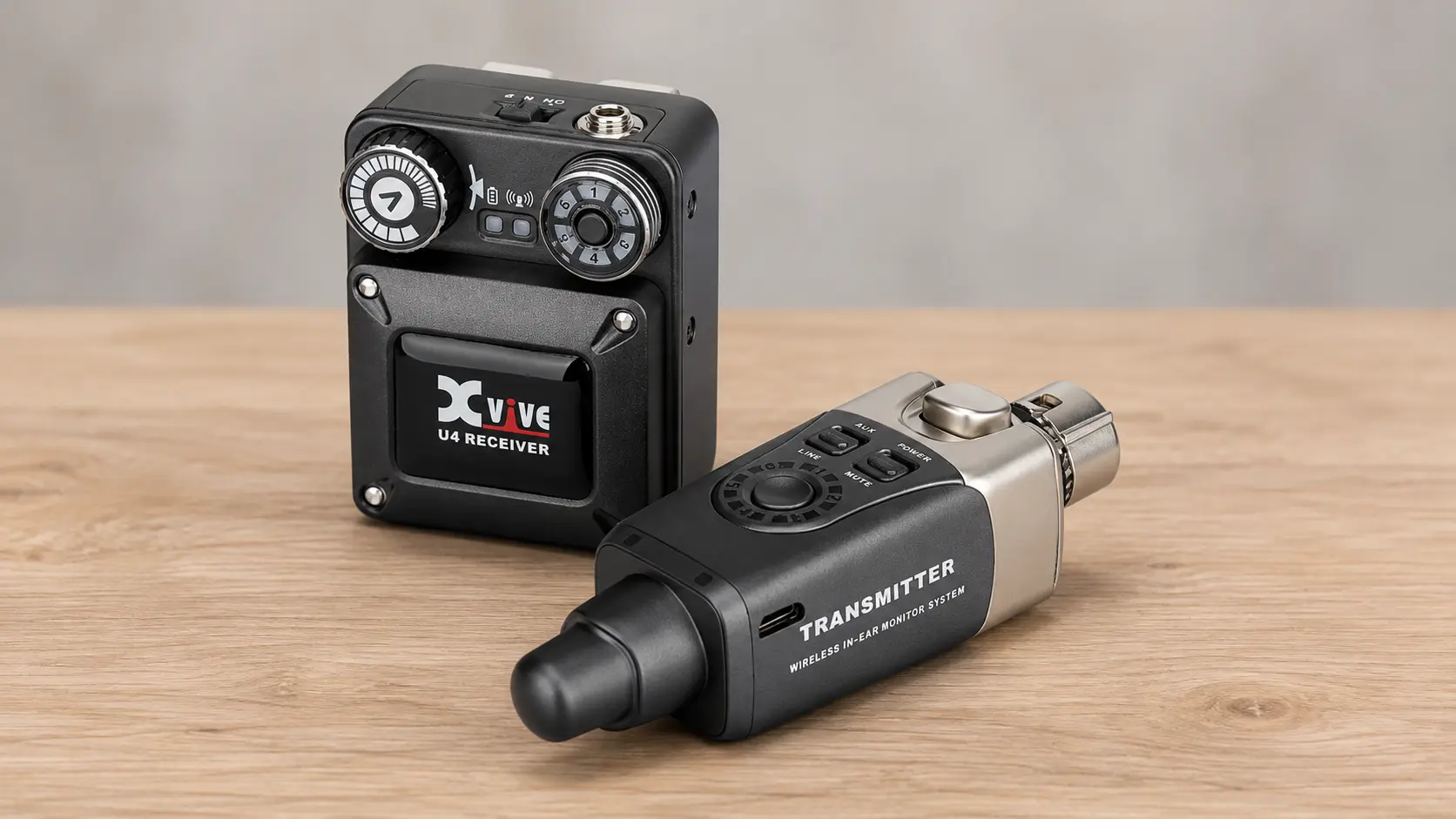
The maker lists under 5 ms of delay, 24-bit/48 kHz audio and six channels, so several systems can work in one room. The earphones are not part of the base set, and they come only in the bundles. At the time we checked, the listed price was $199.99, down from $249.99.
| Spec | Detail |
|---|---|
| Delay | Under 5 ms |
| Range | 90 ft, clear line of sight |
| Battery | About 5 hours |
| Band | 2.4GHz, 6 channels |
- Pro: rated under 5 ms, with 24-bit/48 kHz audio
- Pro: compact plug-on transmitter with USB-C charging
- Con: about 5 hours of battery
- Con: earphones are sold only in the bundles
Xvive U45
The Xvive U45 does the same job on the 5.8GHz band. The transmitter takes a balanced XLR input and the receiver has a 3.5 mm dual-mono headphone output. The receiver has two antennas with True Diversity, which is meant to keep the signal steady.
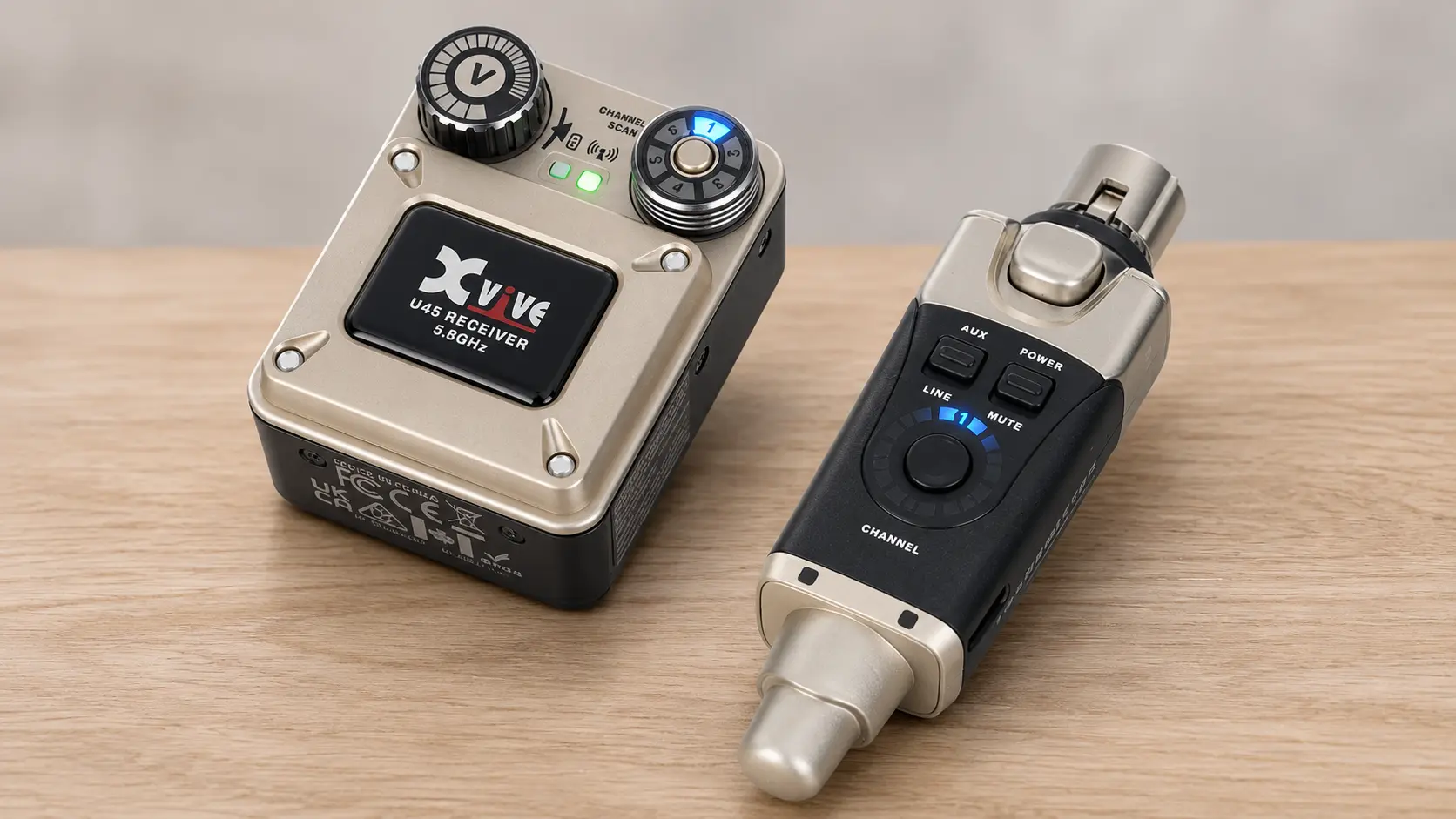
The maker lists under 5 ms of delay, up to 100 ft of line of sight range and six selectable channels. We read that as a better fit for a stage or a rehearsal room with many wireless devices. At the time we checked, the listed price was $229.99, down from $269.99.
| Spec | Detail |
|---|---|
| Delay | Under 5 ms |
| Range | Up to 100 ft, line of sight |
| Battery | Up to 5 hours |
| Inputs | XLR in, 3.5 mm out |
- Pro: 5.8GHz band with True Diversity receiver
- Pro: balanced XLR input for a mixer feed
- Con: up to 5 hours of battery, and the range needs line of sight
- Con: earphones are sold only in the bundles
Bose QuietComfort Ultra Earbuds (2nd Gen)
The Bose QuietComfort Ultra Earbuds (2nd Gen) are the pair we pick for players who want noise cancelling and a codec with a low-latency mode in a normal earbud. The codec list is the reason they are in our top six, since it includes aptX Adaptive, and Bose lists a low-latency mode for it.
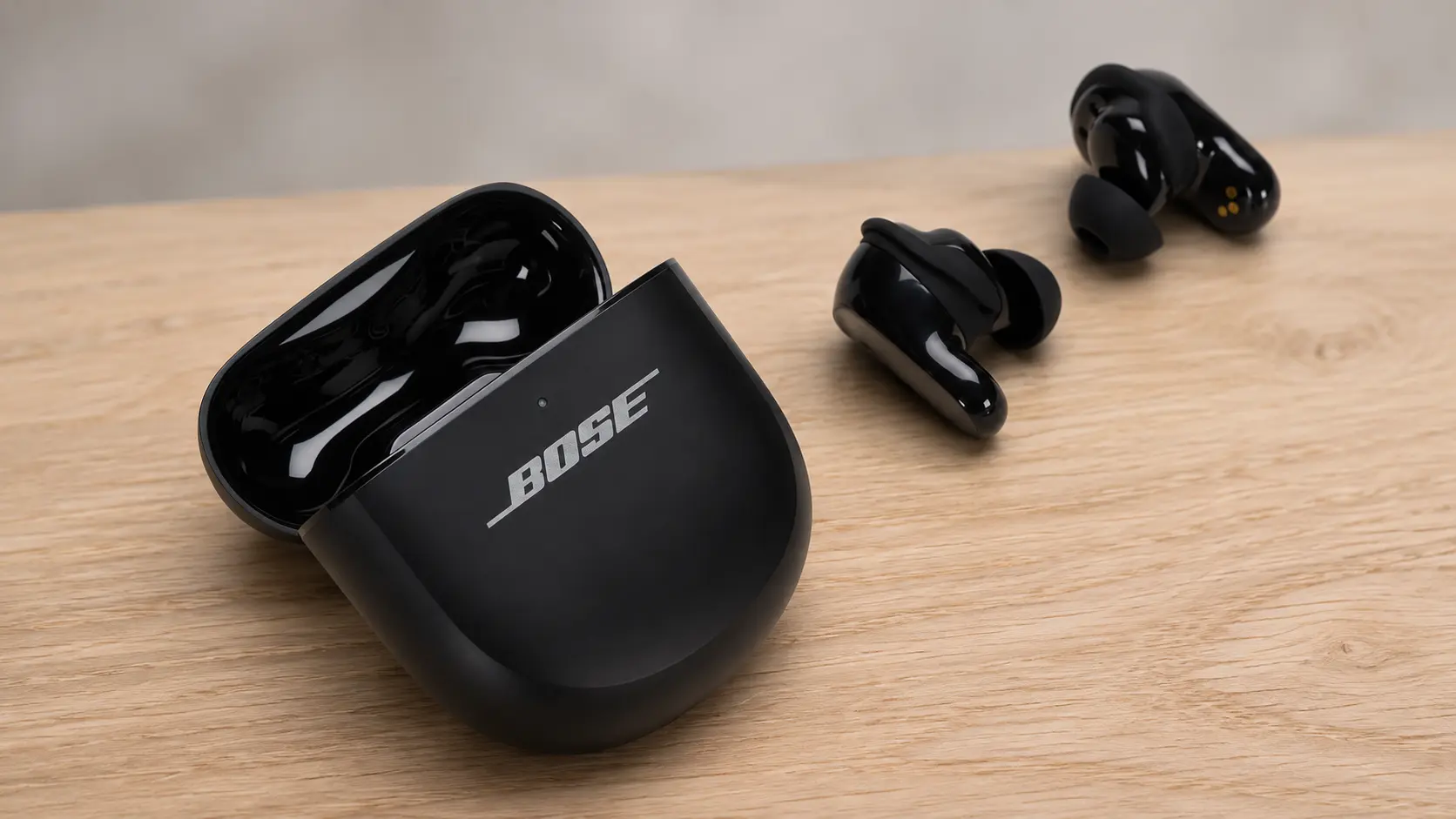
The earbuds use Bluetooth 5.3 and have four microphones per earbud. Bose says they do not receive audio over LE Audio, so a source that supports aptX Adaptive is the key.
| Spec | Detail |
|---|---|
| Codecs | SBC, AAC, aptX Adaptive |
| Battery | 6 hours, case up to 18 hours |
| Charging | 2 hours earbuds, 3 hours case |
| Water resistance | IPX4 |
- Pro: aptX Adaptive with a low-latency mode
- Pro: 20 minute quick charge gives up to 2 hours
- Con: 6 hours per charge, 4 hours with Immersive Audio on
- Con: no LE Audio reception
Apple AirPods Pro 3
The Apple AirPods Pro 3 are the pair we suggest for iPhone owners who use earbuds for listening, practice and checking a mix. Apple lists the H2 chip, active noise cancellation, Transparency mode and Bluetooth 5.3.
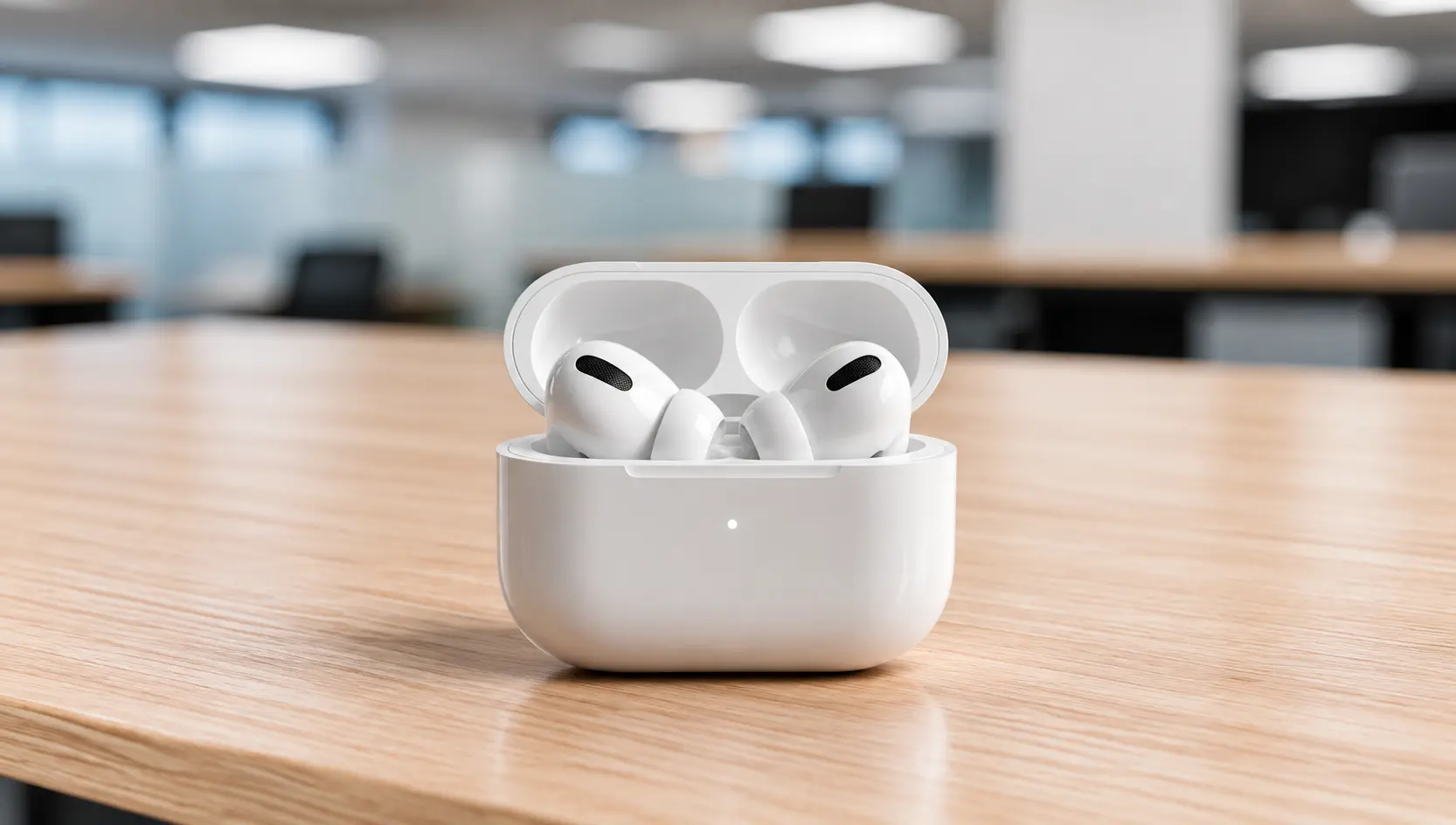
Each earbud weighs 5.55 g, which helps comfort during long practice. Apple does not list a latency figure, so we do not call them a pick for playing in time.
| Spec | Detail |
|---|---|
| Battery | Up to 8 hours, up to 24 hours with the case |
| Water resistance | IP57 |
| Weight | 5.55 g per earbud |
| Chip | Apple H2, Bluetooth 5.3 |
- Pro: IP57 rating and a light 5.55 g earbud
- Pro: up to 24 hours with the case
- Con: Apple lists no latency figure
- Con: the USB-C charge cable is sold separately
Can Musicians Use Wireless Earbuds?
Yes, for some jobs. We see wireless earbuds for musicians as a good fit for home practice, learning songs, listening back to a mix and warming up before a rehearsal.
We see them as a weak fit for live monitoring and for recording while we play, because the Bluetooth link adds delay that we can hear against the beat.
The question people ask most is whether wireless earbuds are good enough for music production. Our answer is that they are fine for checking a mix or a reference track, but not for tracking a part in real time.
If we only listen, the delay does not matter, because the picture and sound are not tied to our hands. If we play, sing or hit a pad, we hear our own action late, and the timing of our playing drifts.
We use this rule when we sort earbuds into groups:
- Listening only: any good pair of true wireless earbuds works.
- Practice with a backing track: a pair with a low latency mode or a USB dongle is the safer pick.
- Recording or stage monitoring: a wired set or a wireless IEM system.
Bluetooth Latency Explained for Musicians
What Latency Is and Why It Matters
Latency is the time a signal needs to travel from the source to our ears. It is counted in milliseconds (ms).
With a wired connection the signal moves almost at once. With Bluetooth the sound is first compressed by a codec, then sent through the air, then stored in a small buffer, and finally decoded in the earbuds. Each step adds a little time.
A video player hides this by delaying the picture to match the sound. A musician cannot do that, because our own playing is the source and there is nothing to delay.
Most players start to feel a delay somewhere around 10 ms. Anything well above that makes fast parts feel loose, which is why drummers and keyboard players notice it first.
Bluetooth Latency Numbers From Tests and Ratings
Figures vary a lot between sources, so we treat any single number with care. Here is how the numbers we found line up, with the type of each one.
| Connection | Latency figure | What it is |
|---|---|---|
| Bluetooth driver in Logic Pro X | 135.3 ms, against 7.7 ms without it | Measured |
| JLab Epic Lab, Bluetooth music | Over 200 ms | Maker rating |
| JLab Epic Lab, USB-C dongle | 50 ms | Maker rating |
| Xvive U4 and U45 | Under 5 ms | Maker rating |
The measured example comes from a MusicRadar test of Bluetooth headphones for music production, and it shows how big the jump can be once a Bluetooth driver is in the chain.
The wide gap between these numbers comes from the codec, the earbuds, the phone or computer and the app we use. Two pairs with the same Bluetooth version can behave very differently.
Low Latency Modes and USB-C Dongles
Some earbuds have a low latency mode that cuts the delay by trading away a bit of sound quality or stability. It helps with games and video, and it can help with practice too.
We think a better fix for musicians is a USB-C dongle. The dongle plugs into our phone, tablet or computer and talks to the earbuds over its own link instead of normal Bluetooth.
The JLab Epic Lab Edition review is a good example. The earbuds come with a dongle that the reviewer says gives a much lower delay than Bluetooth, and it was tested with a MIDI keyboard, an iPad Pro and GarageBand. The maker rates the dongle at 50 ms.
Newer Bluetooth versions also change the picture. To see what a newer standard adds, read our guide to Bluetooth 6 before we decide that our next pair has to be the latest model.
Bluetooth Codecs for Musicians
A codec is the method that squeezes the audio so it fits through the Bluetooth link. The codec affects sound quality and often the delay too, and both our phone and our earbuds must support the same one.
SBC and AAC
SBC is the basic codec that every Bluetooth device supports. It works everywhere, but it is the least efficient one, and sound quality and delay can both vary a lot from one pair to the next.
AAC is the default on iPhone, and on Apple devices it is usually the better of the two. Most earbuds support one or both, so for an iPhone owner this is the pair that counts.
The codec also decides how much of our music survives the trip. A detailed mix with quiet cymbals and room sound can lose some of that detail on a weak codec, and we notice it when we check a mix.
Our comparison of SBC and AAC shows how the two differ, step by step.
aptX and LDAC
aptX and LDAC are the options on many Android phones. LDAC carries up to 990 kbps, which is why it is popular for high quality listening.
A higher bit rate is not the same thing as a lower delay. For a musician, LDAC is a good choice for listening back to a mix, and a poor reason to pick a pair for playing live.
aptX comes in several versions. Some are made for quality and some for a lower delay, so the name on the box does not tell us everything. We always check which version the earbuds list.
Our phone must support the same codec as our earbuds, or the connection falls back to SBC. That is the most common reason a high end pair sounds ordinary.
We compared the two in our guide to aptX Adaptive vs LDAC, and it is worth reading if we own an Android phone.
LE Audio and LC3
LE Audio is the newer Bluetooth audio system, and LC3 is its codec. It is built to give good sound at a lower bit rate, and more earbuds now support it.
The change matters for battery too, since a codec that needs less data lets the earbuds work more efficiently. Support depends on both our phone and our earbuds, and many older phones do not have it.
That means a pair with LC3 on the box may still use SBC with our current phone. We check the phone settings before we count on it.
We explain how it works in our article on the LC3 codec.
Our rule is simple. We pick the codec our phone supports best, and we do not expect any codec to fix the delay by itself.
Wireless Earbuds vs Wireless In-Ear Monitor Systems
A wireless in-ear monitor system, also called a wireless IEM system, is a different tool from Bluetooth earbuds. It has a transmitter that plugs into a mixer, an interface or an instrument, and a small receiver that we clip to our belt and connect to wired earphones.
It does not use Bluetooth. It uses its own radio link, usually on the 2.4GHz or the 5.8GHz band, and makers rate the delay at under 5 ms.
| Feature | Wireless earbuds | Wireless IEM system |
|---|---|---|
| Connection | Bluetooth | Own radio link, 2.4GHz or 5.8GHz |
| Delay | Tens to hundreds of ms | Rated under 5 ms |
| What we carry | Earbuds and case | Transmitter, receiver and earphones |
| Best for | Practice and listening | Stage, rehearsal and recording |
| Setup | Pair and play | Connect to a mixer or interface |
When Wireless Earbuds Are Enough
We find wireless earbuds enough when we listen more than we play. That covers learning a song, reviewing a rehearsal recording, listening to a mix on the way home and practicing along to a track.
They are also the easiest option. We pair them once, and there is nothing else to carry.
When We Need a Wireless IEM System
We need a wireless IEM system when we play on stage or record, and we must hear ourselves and the band without delay. It also makes sense when the whole group needs the same mix.
The Xvive U45 and U4 from our list are two examples. The U45 uses the 5.8GHz band and the U4 uses 2.4GHz, and the makers rate both under 5 ms.
Range and battery are ratings in open space, and a crowded venue with many wireless devices can cut them. That is the reason many players prefer the 5.8GHz band for busy rooms and 2.4GHz for small ones.
What to Look For in Wireless Earbuds for Musicians
These are the points we check first when we look at earbuds for musicians.
Sound Accuracy and EQ
A flat, honest sound is easier to work with than a boosted one. An EQ in the app helps, because we can pull back a heavy bass and hear the mix more clearly.
Fit and Isolation
Fit is the part we weigh most. A good fit keeps the earbuds in during movement, and it blocks outside noise so we can keep the volume down.
We try different ear tips. Foam tips often seal better than silicone, and a better seal gives us more bass and less leaking sound.
Active Noise Cancellation vs Ambient Mode
Noise cancelling is useful on a train and in a loud rehearsal room. It can feel strange when we play, because it changes how our own instrument sounds.
An ambient mode lets the room in, which helps when we play with others. We explain how the feature works in our article on active noise canceling.
Battery Life and Charging
We check the battery rating for the earbuds alone, not only with the case. A long rehearsal can run longer than a pair that lasts five or six hours on one charge.
Turning on noise cancelling or a low latency mode often cuts the listed time, so we read the fine print.
Multipoint and Connection Stability
Multipoint lets the earbuds stay connected to two devices, for example a phone and a laptop. It is handy when we switch between a backing track and a call.
Some codecs do not work together with multipoint, so we check the details. To see what the newer standard brings, read our explainer on LE Audio.
Durability and Sweat Resistance
Earbuds for musicians live in bags, pockets and gig cases. We look for an IP rating that covers sweat and dust, and for a case that does not scratch easily.
Hearing Protection and Safe Volume
Hearing protection for musicians is not optional. Because earbuds sit in the ear canal, loud music reaches the ear directly, and the damage builds up slowly.
We keep the volume at a level where we can still talk, take breaks during long rehearsals, and use a tight seal so we do not need to turn it up.
How to Test Wireless Earbuds for Musicians Before We Buy
Specs only tell part of the story, so we always run a few simple checks. We can do all of them at home in about ten minutes, and we check the return policy before we buy.
- Tap test: play a click track and tap a pad or a desk in time. If the tap and the click drift apart, the delay is too big for playing.
- Clap test: record ourselves clapping and listen back through the earbuds. A gap between the clap and what we hear shows the delay at once.
- Fit test: shake our head and move around. The earbuds should stay in place and keep the seal.
- Volume test: play a familiar track and find the lowest level where we hear every part. A good seal lets us keep it low.
- Connection test: walk to another room and see when the sound breaks up.
We run the same checks with every pair we consider. Comparing two pairs in a row shows differences that a spec sheet hides.
Mistakes to Avoid With Wireless Earbuds for Musicians
These are the mistakes we avoid when we buy a pair.
- Buying for bass: a heavy bass sounds fun, but it hides the detail we need to judge a mix.
- Trusting the codec alone: a good codec improves sound quality, and it does not remove the delay.
- Ignoring the fit: a pair that does not seal forces us to raise the volume, and that is bad for our hearing.
- Skipping the dongle details: a USB-C dongle needs a free port on our device, so we check that it fits our phone or computer.
- Forgetting the earphones: some wireless IEM systems are sold without earphones, so we add that cost to our budget.
- Using wireless for the one job that needs a cable: if we record parts in time, we keep a wired set in our bag.
Wired Backup and Hybrid Setups
A wired backup is cheap and it saves a show. If the Bluetooth link drops in the middle of a rehearsal, a cable gets us back to work in seconds.
Some products mix both. The Sennheiser IE 100 Pro Wireless from our list uses a Bluetooth module with a detachable cable, so we can use it wired for monitoring and wireless for listening.
We see a hybrid as a good choice if we want one pair for the stage and the commute. The wired mode gives us zero Bluetooth delay, and the wireless mode gives us freedom when we do not need timing.
Quick Comparison: Earbuds, IEM Systems and Wired
| Option | Delay | Best use |
|---|---|---|
| Bluetooth earbuds | High | Listening and practice |
| Earbuds with a USB-C dongle | Lower | Practice and light production |
| Wireless IEM system | Under 5 ms | Stage and rehearsal |
| Wired earphones | None | Recording and tracking |
Final Verdict
The best wireless earbuds for musicians are the ones that match the job. For practice and listening, a good pair of true wireless earbuds is enough.
For recording and the stage, choose a wired set or a wireless IEM system, because the delay on a normal Bluetooth link is too big for playing in time. If we want one pair that does a bit of both, a model with a USB-C dongle or a wired mode is the best compromise.
We check the codec, the fit and the battery before we pay, and we keep the volume low. Our ears are the one part of the setup we cannot replace.
FAQ
What earbuds do musicians wear on stage?
Most musicians wear in-ear monitors, either wired or on a wireless IEM system, with a tight seal. Bluetooth earbuds are rarely used on stage because of the delay.
Can wireless earbuds be used for music production?
They work for listening to a mix and for checking a reference track. For recording parts in time, a wired set or a pair with a USB-C dongle is the safer choice.
Do wireless earbuds have latency for recording?
Yes. Standard Bluetooth adds a delay that varies with the codec, the earbuds and the device. One test measured 135.3 ms with a Bluetooth driver, against 7.7 ms without it.
What is the difference between wireless earbuds and wireless IEM systems?
Wireless earbuds use Bluetooth and have the receiver built in. A wireless IEM system uses a transmitter and a belt receiver on its own radio link, and makers rate the delay at under 5 ms.
Do musicians prefer wired or wireless earbuds?
For recording and playing in time, most prefer wired because there is no delay. For practice and everyday listening, many choose wireless for the comfort.