Headphone sensitivity refers to how efficiently headphones convert electrical power into sound. This is usually measured in dB SPL per mW, meaning how many decibels of sound pressure (SPL) the headphones produce with 1 milliwatt of power.
You’ll often see this listed as dB SPL/mW in spec sheets. Higher numbers mean the headphone gets louder with less power. For example, a pair rated at 105 dB/mW will sound louder than one rated at 95 dB/mW when both connect to the same device.
Our tests show this practical effect clearly. One tester used a FiiO KA11 DAC with budget IEMs rated at 112 dB/mW and barely pushed the volume slider past 20%. Switching to lower-sensitivity over-ear headphones (around 91 dB/mW) required almost full volume on the same source to reach similar loudness.
Sensitivity vs Impedance: What’s the Difference?
Sensitivity and impedance often appear together, but they measure different things.
Impedance measures electrical resistance, usually shown in ohms (Ω). Headphones with higher impedance need more voltage to get loud. Sensitivity measures how much sound you get from a given amount of power.
We’ve tested headphones rated at 250 ohms with low sensitivity. They sounded quiet or flat when plugged into phones or controller jacks. The same models came to life with a proper amp or DAC. In contrast, something like the Logitech G733, with low impedance and high sensitivity, works great even on weak onboard audio.
You can’t look at sensitivity or impedance alone. The combination tells you how headphones will behave with your setup.
Why Sensitivity Matters in Gaming Headsets
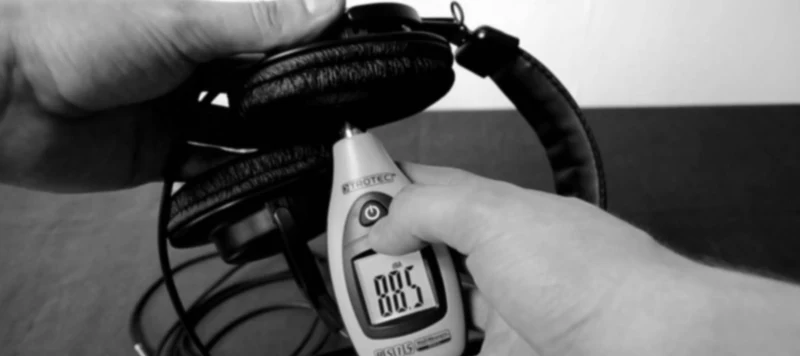
We’ve tested enough headsets to know sensitivity makes a difference, especially with onboard audio or direct controller connections. You might not notice it immediately, but you’ll understand once you try a headset that’s too quiet.
One tester used the BlackShark V2 X with a PS5 controller for about a week. Rated around 100 dB/mW, it needed nothing extra. It got loud without distortion, and everything in Valorant sounded clear. Footsteps were easy to follow, reloads had weight, and mic monitoring worked fine.
For comparison, we tried studio headphones rated closer to 93 dB/mW with the same setup. We had to crank the volume all the way up. The sound still struggled to emerge. Bass felt soft, highs lost sharpness, and small in-game cues became harder to hear.
We’ve seen this pattern repeatedly. If sensitivity is too low and you’re not using an amp, the headset doesn’t get enough power. We consider 98 dB/mW the minimum for console or handheld use. Anything lower typically requires a DAC or interface.
Common Sensitivity Ranges Explained
Based on our testing, here’s how sensitivity usually plays out:
90-100 dB/mW
These usually need help. We’ve tried several in this range on laptops and Switch, and most weren’t loud enough without an external DAC. They sound good but lack strength on their own.
100-110 dB/mW
This is the sweet spot. Most gaming headsets we prefer fall here. They don’t need an amp, and volume scaling feels natural. You get detail with enough headroom for louder listening.
110+ dB/mW
These are easy to drive. Even with a phone or cheap USB dongle, you’ll get volume. However, some can reveal noise or hiss if your source isn’t clean. We experienced this with a few budget IEMs.
We conducted a back-to-back test with the DT770 Pro 250 Ohm and the Corsair HS55. Same machine, same port. The DT770 didn’t get loud enough until we used an interface. The Corsair worked immediately without issues.
Real-World Headphone Examples
Here are results from headphones we’ve actually used:
M50x – 99 dB/mW. Works fine with most sources. It sounds better with a DAC, but doesn’t require one.
HD560S – 110 dB/mW. Super easy to run. We used it on a laptop and Switch without feeling it lacked power. Clear and loud.
Cloud Alpha – About 103 dB/mW. We’ve tested it across Steam Deck, Xbox, and other devices. Never needed anything extra.
SRH440 – Closer to 97 dB/mW. This one struggled on basic outputs. It sounded much better with an interface.
We also tried a budget headset claiming 114 dB/mW. It got loud quickly, but when we plugged it into a USB-C dongle, there was constant background hiss. Sensitivity helps, but it also exposes flaws in your audio chain.
How Sensitivity Affects Sound Quality
Sensitivity helps with volume but doesn’t fix bad sound. We’ve tested headsets that got loud quickly but fell apart past 70% volume. Mids became muddy, highs turned harsh, and bass either boomed or disappeared depending on the track.
One tester used budget IEMs rated at 112 dB/mW and noticed sharp hiss with a cheap dongle. You wouldn’t hear it in game menus, but it became annoying during quiet scenes or calls. Higher sensitivity makes volume easier to achieve but also picks up more source flaws.
With good tuning, higher sensitivity can sound excellent. We tested several models in the 103-107 range that stayed clean even at max volume. It depends on driver construction and headset tuning. A loud headset doesn’t always mean a good one.
Choosing the Right Sensitivity for Your Setup
We’ve tested headphones with phones, laptops, USB-C dongles, audio interfaces, and handhelds. The best results come when sensitivity matches the gear.
For controller, laptop jack, or handheld use like Steam Deck, choose something over 100 dB/mW. We’ve used Cloud Alpha and G435 this way without reaching full volume.
With a proper interface like Focusrite or a small DAC, you can manage 95-98 dB/mW. We tried the DT770 Pro on an iFi Zen and had plenty of headroom.
For phones or tablets, we check if the headset gets loud enough without sounding harsh. Some higher sensitivity models sounded fine with older USB-C dongles, while others introduced hiss or noise with unclean DACs.
In one case, 96 dB/mW studio monitors worked fine through a MacBook’s headphone jack, but a Windows laptop couldn’t push them past 60% volume. This difference won’t appear in product specs.
Final Thoughts: Why Sensitivity Still Matters
Most people don’t check sensitivity until they encounter problems. We’ve been there: you plug in a headset, crank the volume, and the sound still doesn’t emerge properly.
It’s not the only important factor, but it’s one of the easier specs to check before buying. If you know what you’re plugging into and how much power it provides, you’ll avoid trouble.
We’ve had the best results with headsets between 100 and 110 dB/mW. They’re easy to use, don’t need extra gear, and work with almost everything. For lower sensitivity, ensure you have the right output. For higher sensitivity, verify your source doesn’t introduce noise.
FAQs About Headphone Sensitivity
Do all headphones list their sensitivity?
Not all of them. Gaming brands sometimes skip it. You’ll see it more with studio or audiophile gear.
Is higher sensitivity always better?
Not really. Higher means easier to power, but that doesn’t say anything about the tuning. Some of the loudest sets we’ve tried didn’t sound good at all.
Can I change sensitivity by using an amp?
No. Sensitivity is built into the driver. An amp can help with power, but it doesn’t raise the sensitivity rating.